10 Features Every Codeless Test Automation Tool Should Offer
Codeless test automation tools (also known as no-code or low-code test automation tools) have become an integral part of modern software development. They lower the barrier to entry, democratizing software testing and QA so that non-technical team members can contribute. However, not all codeless test automation tools are created equal — some prioritize features that are flashy and exciting in sales demos, but don’t end up providing much value in the long run. Today, we’re going to cover some of the most important (and often less-discussed) features that your codeless test automation platform should include to ensure that it stays relevant and effective for years to come.
Top 10 Features That Your Codeless Test Automation Tool Should Have
1. Smart Element Locators
One of the biggest problems with test automation is that testers develop against an application at a given moment in time. When the application changes, those automation scripts may break (this is true of both codeless and scripted automation frameworks).
There's an opportunity for codeless solutions to have an advantage over coded frameworks by gathering more than one element locator during the recording. In the event that a locator is no longer found during playback, the alternative locators for that element can be tried. This gives the tester a far better chance to develop stable scripts that don't require as much maintenance.
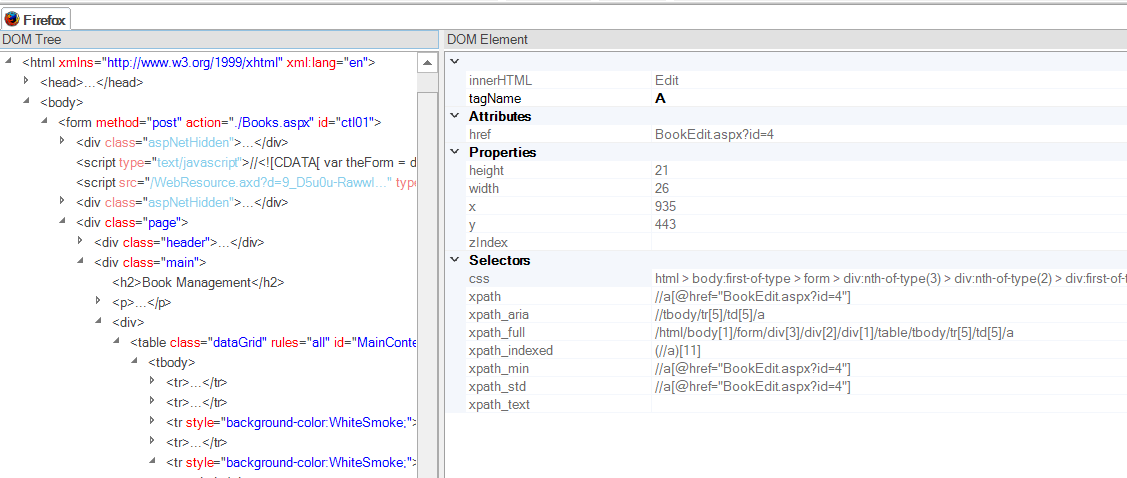
Unlike hand-written test automation code, modern codeless testing tools should be “object-based.” This means that regardless of whether the application being tested is web, mobile, or desktop, the platform defines a list of reusable UI objects that are used in your test scenario. This separation of object from test flow is key, it allows you to create maintainable tests. However, that is only part of the story — each object in Rapise uses a series of “smart locators” to identify the object on the page, allowing it to more easily cope with changes in the application:
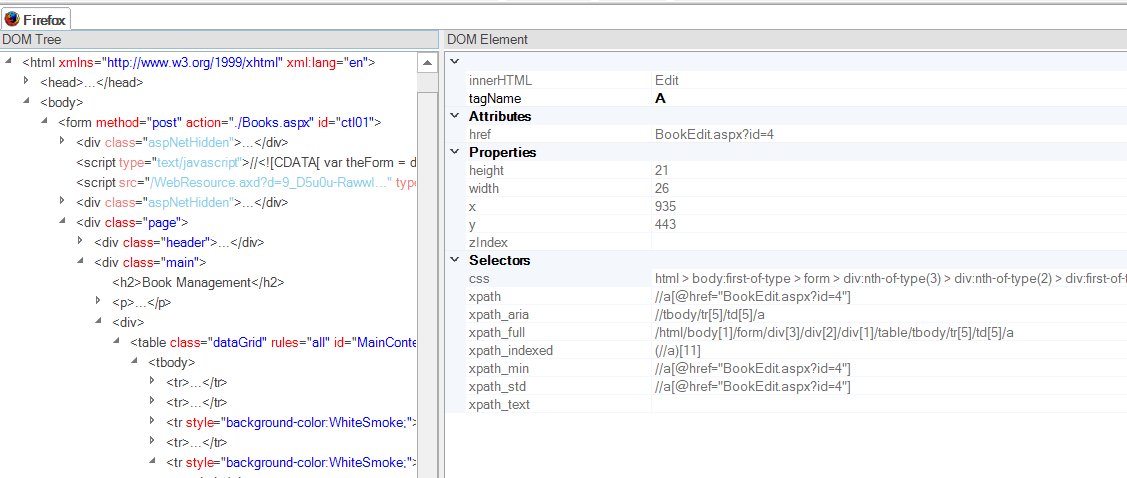
Using multiple locators to find an object on the page is another valuable aspect of smart element locator capabilities. The test automation tool might try each of the locators in turn, so that even if the application has changed and some of the locators fail, it will still be able to find it:
Going Beyond Standard Smart Locators With Rapise
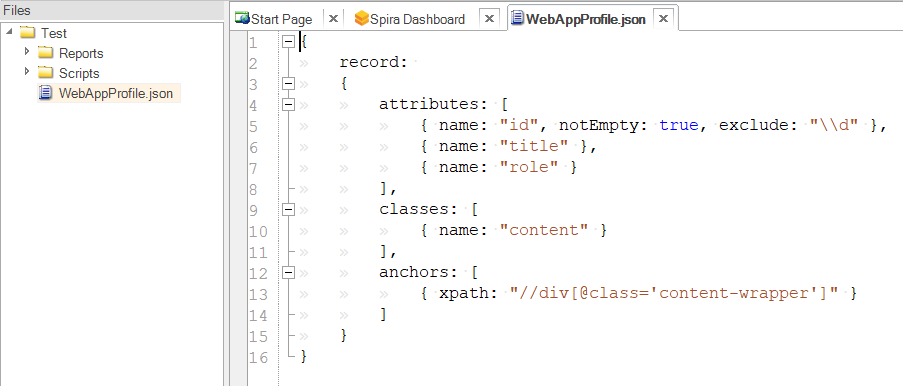
Rapise goes a step beyond this and allows you to define “application profiles” that let you train Rapise to understand the specific nuances of your application. In other words, you can tell it what attributes and elements are most important and which can be ignored. For example, in some applications, the element IDs are stable and serve as reliable anchor points for locating elements on the page. However, in other applications, the IDs contain session values that can change on every page load, making them much less reliable.

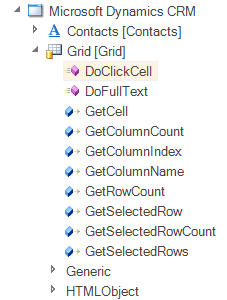
Finally, for more complex applications like ERPs and CRMs (e.g. Microsoft Office365, Dynamics365, and Salesforce), Rapise includes custom libraries where our automation engineers have prepared “accelerators” that allow the platform to recognize complex controls on the page (such as grids, treeviews, and menus), making them easier to automate and much simpler to maintain.
For example, instead of Rapise recording that you clicked on a hyperlink inside a table, it records that you added a row to the new Salesforce Lead entry line. These custom libraries are completely extensible and can be written by your own automation engineers, which can then be used by non-programmers.
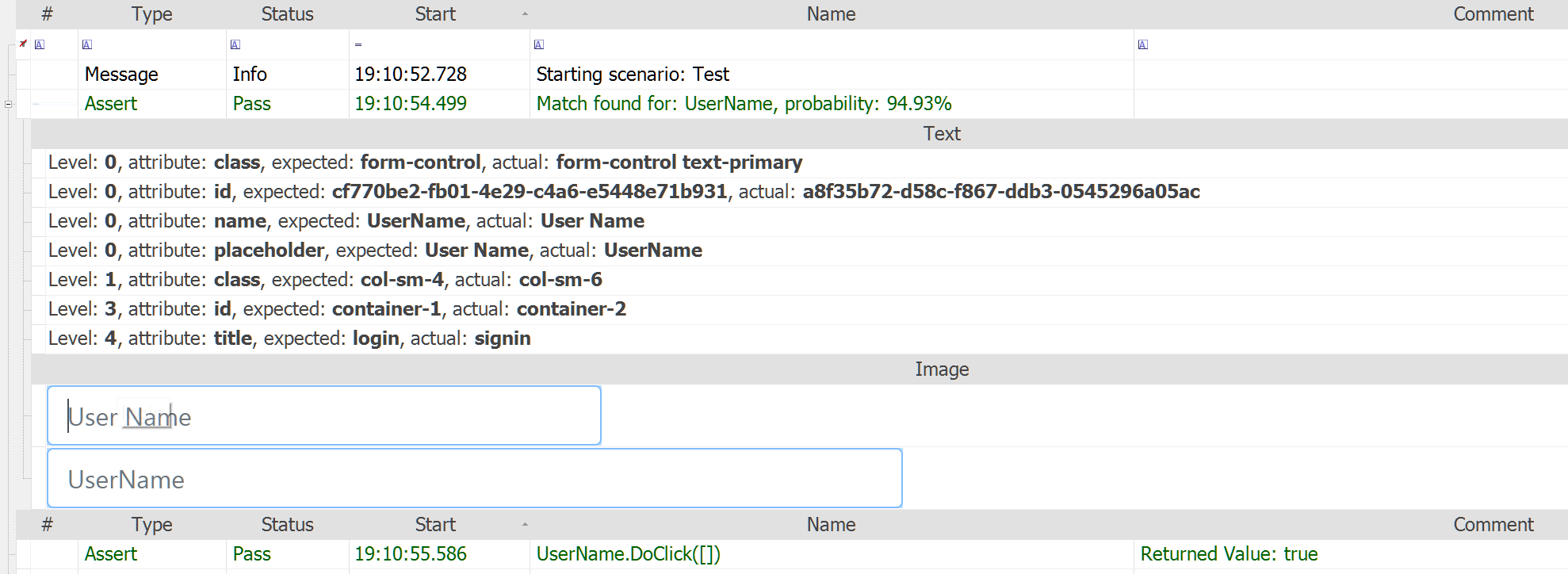
Rapise also features some of the most advanced self-healing tests in the industry. It uses object repositories, AI-assisted recovery flows, and contextual analysis to find an element on the screen, and then uses the saved intent and visible interface context to probabilistically determine if there is a match or not during playback:

As a result, Rapise begins to learn when a design change in the application causes a behavioral change, as opposed to the application not working correctly.
2. Conditional Waiting
Record-and-playback tools that require script authors to insert pauses between steps are not only tedious to use but also promote a test automation anti-pattern as well. A more modern approach, called conditional waiting, has proved to be much more reliable. In this approach, scripts don't blindly wait x number of seconds before continuing to the next step — instead, they wait until a condition is true and then proceed as soon as possible.
This drastically cuts down on the execution time of the automation suite while also preventing flaky tests. Codeless tools should, at the very least, allow script authors to insert conditional waiting, but it would be even better if the tools took care of this behind the scenes.
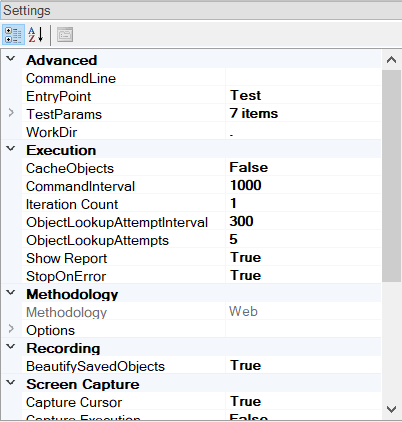
Effective codeless test automation tools typically include various options for handling the playback speed of your tests, such as the standard playback speed or the number of times to retry finding an object:
However, it’s also very useful for your test automation platform to be able to wait conditionally for either an object to become available, or for a specific attribute to be set on the property (e.g. wait until the button is visible or enabled). Rapise makes it easy to do this by dragging on the Global utility methods to your test:
In addition, Rapise has powerful automated checks built in. This means that it knows to wait until an element is available in the application, connected to the browser DOM, and not in a hidden layer. Put simply, in most cases, you can simply record events and actions and let Rapise do the rest.
3. Control Structures
One of the major limitations of older record-and-playback tools was the absence of control structures, such as loops and conditional clauses. A script author who needed to repeat an action 10 times would need to record that action 10 times and maintain each one of the actions individually. At the same time, if there were multiple viable alternatives within a step and the test author wanted to take one action if a certain condition was true, and a different action if it was not, there was no support for such logic.
In coded automation frameworks, testers use loops and if-else clauses to control the flow of scripts. This is a key requirement for codeless solutions if the project is to be scalable.
Rapise Provides Even More Powerful Control Structures
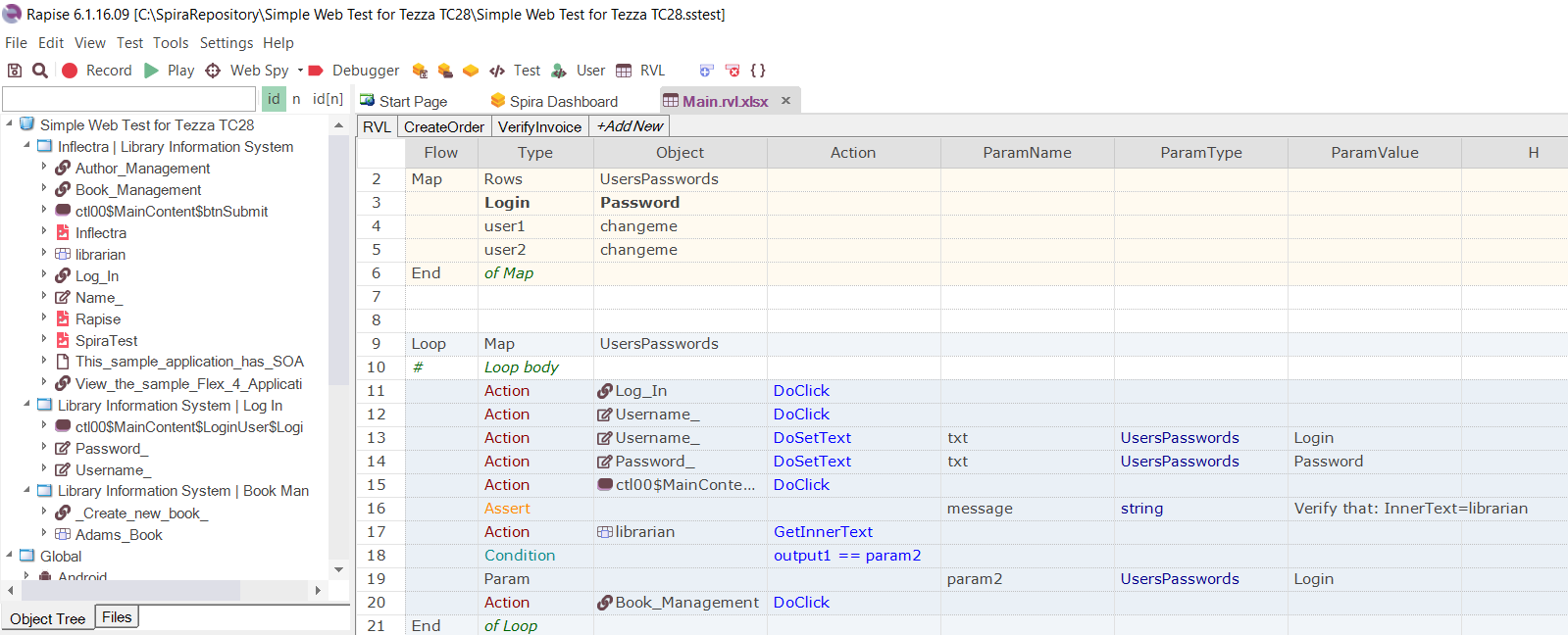
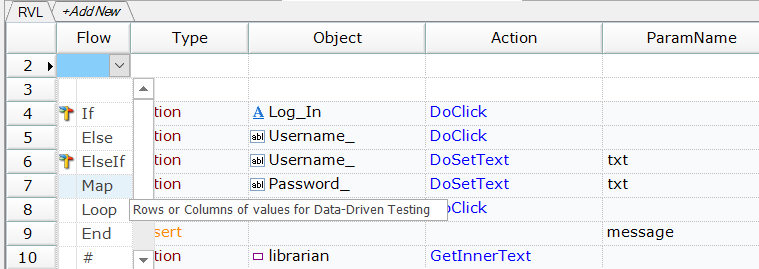
Rapise’s unique “Rapise Visual Language” (called RVL) was designed from the outset to provide the key control structures for writing tests that can test multiple branches and handle varying test data. Within Rapise, you can define a set of data called a “Map”:
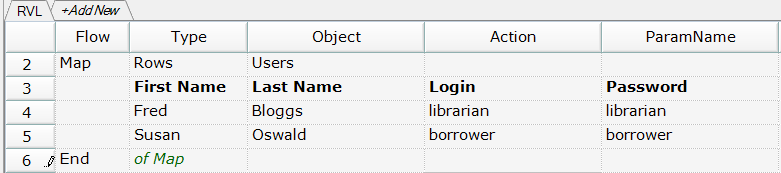
When you create a Map, Rapise generates a data set that you can populate with different values that need to be tested:
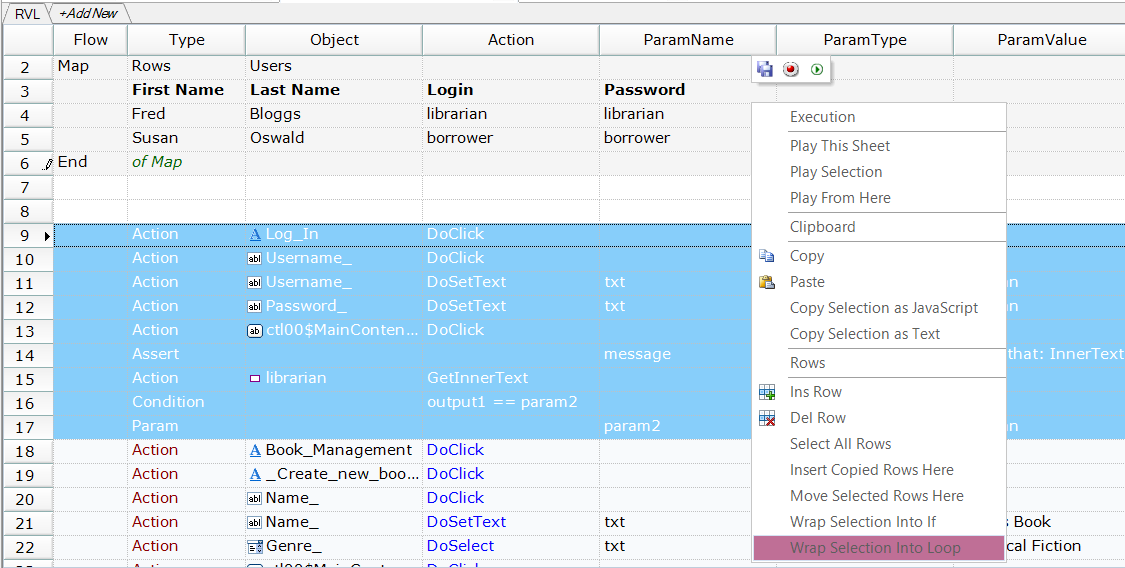
Now you can simply wrap the appropriate sections of your test scenario with a loop and associate it with the Map:

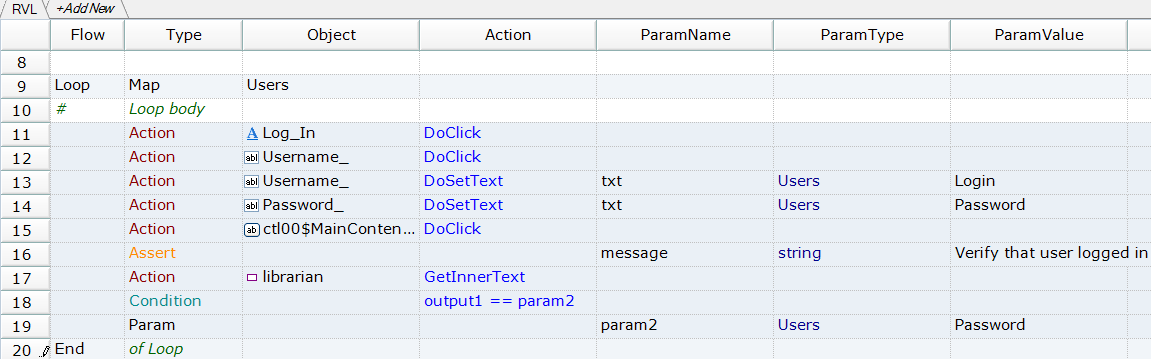
Rapise will then convert the section of the test into a looped section associated with the Map. You then just need to use the dropdown menus to replace the hardcoded values with the columns from the Map:
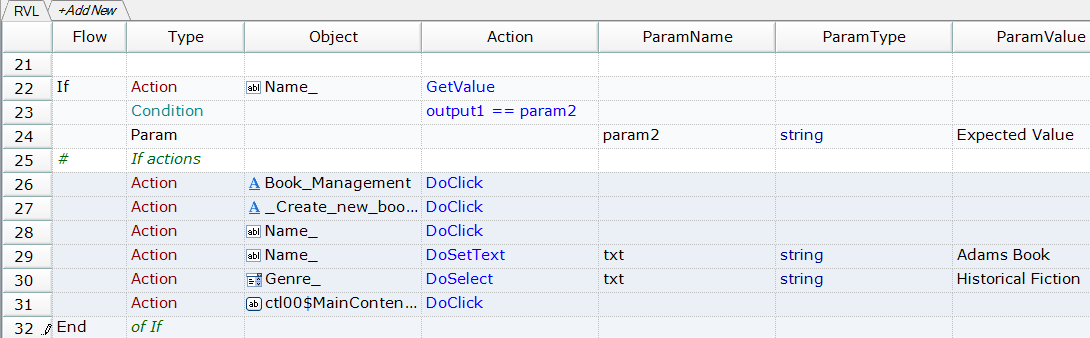
Using if/then/else branches to control the flow in the test is just as easy. You use the option to wrap selection into an if statement to specify what happens in each branch:
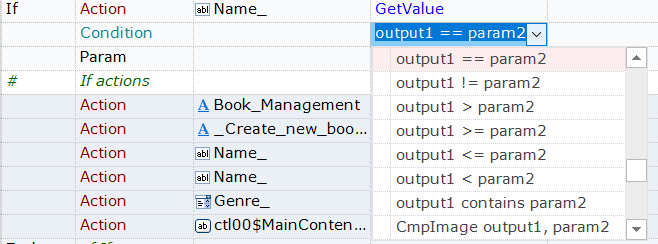
Rapise includes a wide variety of control conditions that let you do various types of comparison, “fuzzy” matches, and range checks, all without any code or programming script:
4. Easy Assertions
Recording a scenario is fairly easy to do. As the user takes action on an application, the tool records those actions. However, when a user validates the actions, that does not usually include a web action. It’s something that you do with your eyes. Because of this, adding assertions within codeless automation tools has always been a pain, requiring manual entry by the user to describe what needs to be validated. This is neither intuitive nor easily expressed.
The process of adding assertions should be as simple as adding the navigational steps. Great consideration should be given to this feature, since it's the most important part of the test script.
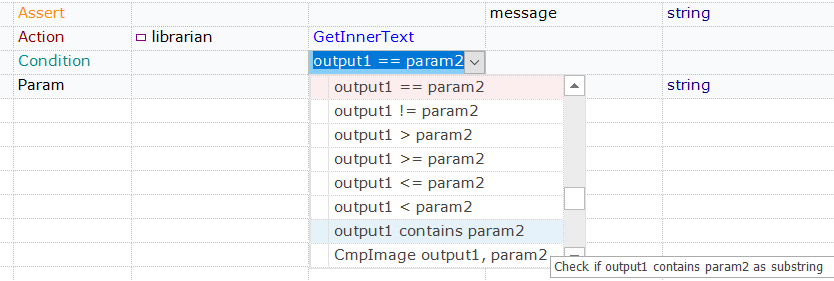
The best codeless test automation tools make assertions and verification as easy as recording the initial steps. Tools like Rapise then take these verification actions and convert them into codeless assert statements:
You can modify the assert directly in the test scenario by simply changing the dropdown. For example, you may want to change the comparison of login names to be a text broad match rather than an exact match:
5. Modification Without Redo
Most older record-and-playback tools did not allow authors to easily edit recorded scenarios. If the flow of a scenario changed and you needed to insert a new action in the middle of the scenario, you had to re-record the entire scenario. That's not ideal.
As the application under test changes, the test scripts need to change as well. This may require adding or removing steps from a flow, or slightly changing existing ones. Codeless automation tools should recognize this as inevitable and make it as simple as possible to accomplish this.
If the objects on the page have changed enough that you need to remap an object in your testing platform to an object on the page, effective test automation tools shouldn’t require changing your test script at all, they should be able to simply “re-learn” the object:
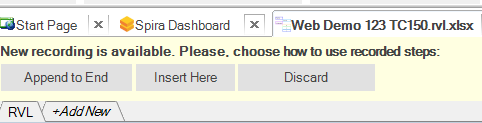
When you record new steps, codeless test automation systems should provide the option of either appending them to the current test script or inserting them at a specific location:

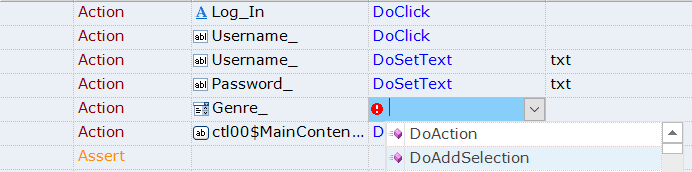
Finally, the most intuitive tools like Rapise allow you to just drag and drop objects and actions from the object tree. You can also choose them from the test script grid to create additional steps or modify existing steps without any recording at all:

Whichever option you prefer, modifying test scripts in Rapise never requires redoing the entire recording.
6. Reusable Steps
Some steps exist in multiple scenarios. For example, logging into an application may be something that the majority of tests must do. Recording this action in each of those tests is what leads to maintenance nightmares — if anything changes with the login step, the test author would need to update every test that contains this.
Codeless tools should allow authors to record common steps that they can then insert into any test flow. This not only saves time in authoring, but also promotes reusability and makes maintenance much simpler. Similarly, the tools should support the use of variables within tests to allow for reuse of state between the steps.
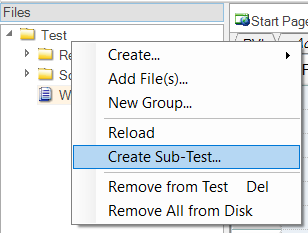
Modern codeless test automation tools usually provide many options for reusable steps, including the ability to break a single test project into multiple smaller test projects called “Sub-Tests”:
For example, in Rapise, you can simply call sections of the sub-test from the main test:

However, one of the simplest options that you can use in Rapise is the ability to break down your test scenario into reusable sections (called test sheets) that can be called from the main test flow:
Rapise also allows you to reuse variables and test data between the various test sections, making it faster than ever to get up and running.
7. Cross-Browser Support
Many record-and-playback tools come in the form of a browser extension, which means they may be tied to a specific browser. But many product teams must run tests across multiple browsers. Test authors should be able to record a scenario once on a given browser and be able to play that recording on any other major browser.
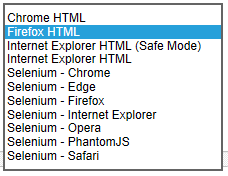
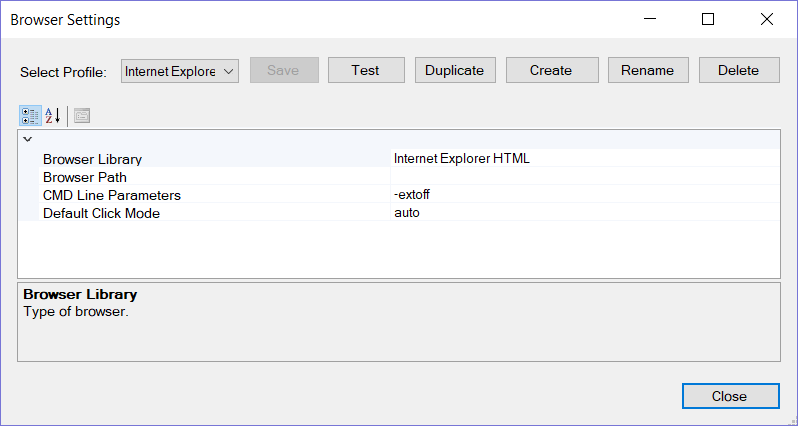
When comparing codeless test automation tools, look for platforms that let you record and execute tests in multiple browsers without any changes to your test script. For example, facilitating recording in Firefox, Chrome, or Internet Explorer:
You might also want to look for tools that enable you to play back your tests against a wider selection of web browsers (e.g. Edge, Safari, Opera, etc.) using the Selenium Web Driver API:
For further flexibility, Rapise allows you to use different web browser profiles for testing different versions of the same browser or launch it with a specific setting (e.g. run Chrome in Private browsing mode):

However, Rapise isn’t limited to just web applications — its codeless methodology and object-based recording can also be used to test mobile apps (iOS or Android) and desktop applications that use a variety of underlying technologies (Windows, Java, RCP, Qt, PowerBuilder, and more).
8. Advanced Reporting
Effective and transparent reporting is a must-have for test automation, especially when testers are executing hundreds (or thousands) of tests. Triaging any failures should not require reruns or extensive debugging. An automatically generated report with details on what occurred, screenshots, and even a video of the recording would be very helpful.
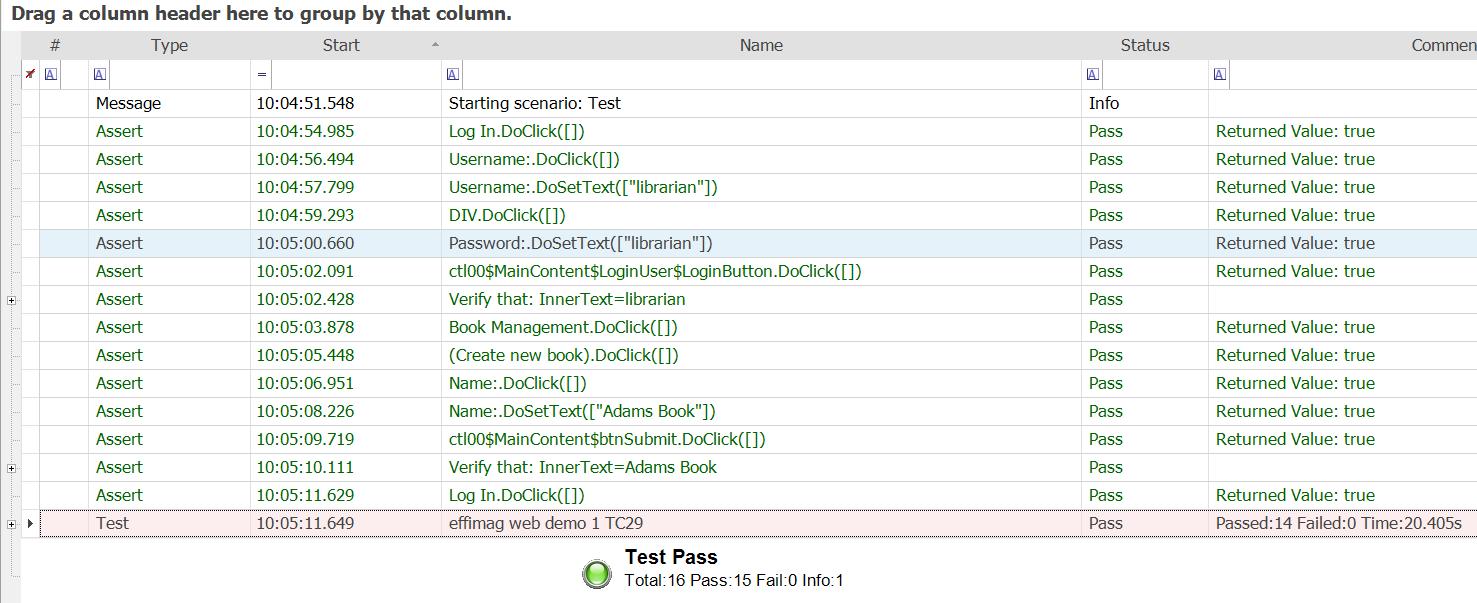
Your codeless test automation tool should come with out-of-the-box automated reporting that captures the pass/fail from every action and assertion/condition in your test script:

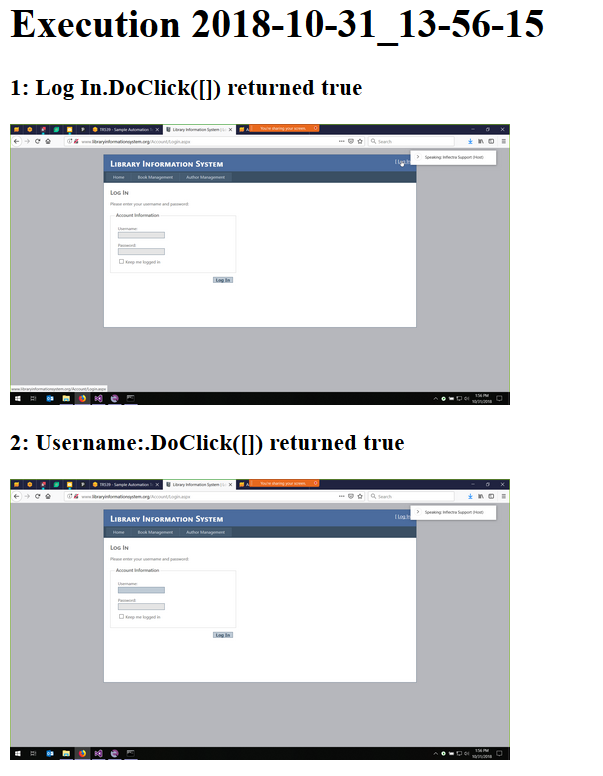
When tests fail, it’s useful to see screenshots of what happened when the test ran. Rapise’s automated testing includes built-in screenshot capture with the ability to display the actions as a “screen flow”:

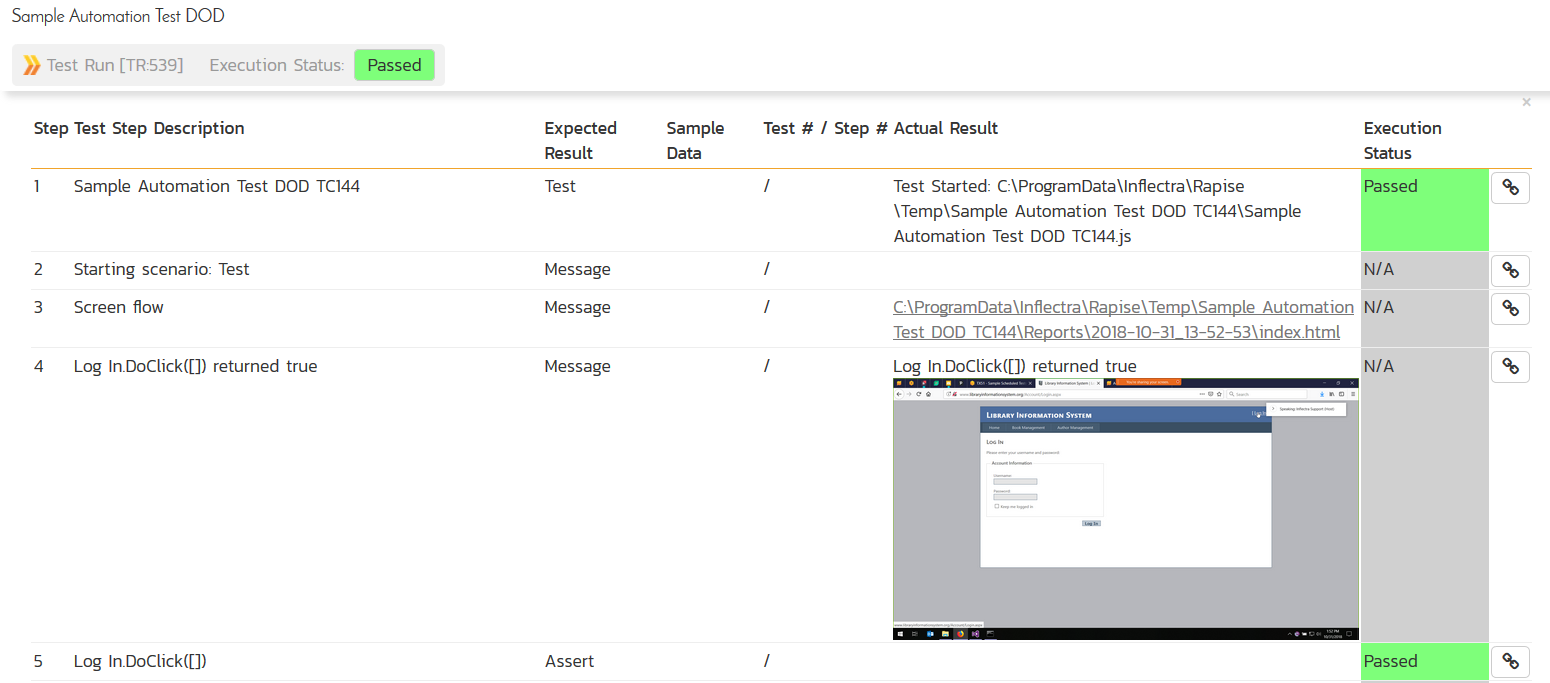
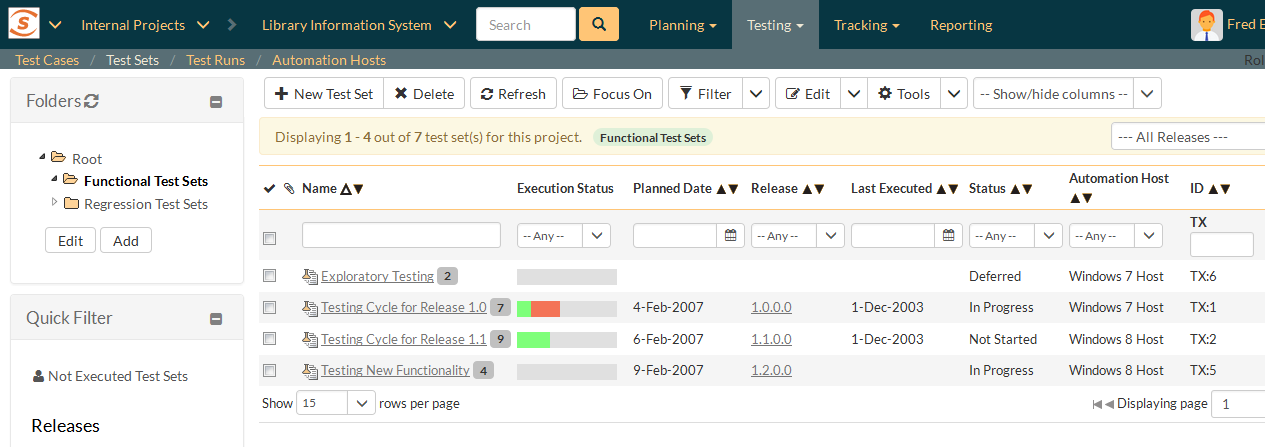
When you use Rapise with SpiraTest, our advanced test management platform, you can securely store and version your automated tests and simultaneously have a central web-based repository of all your test results:
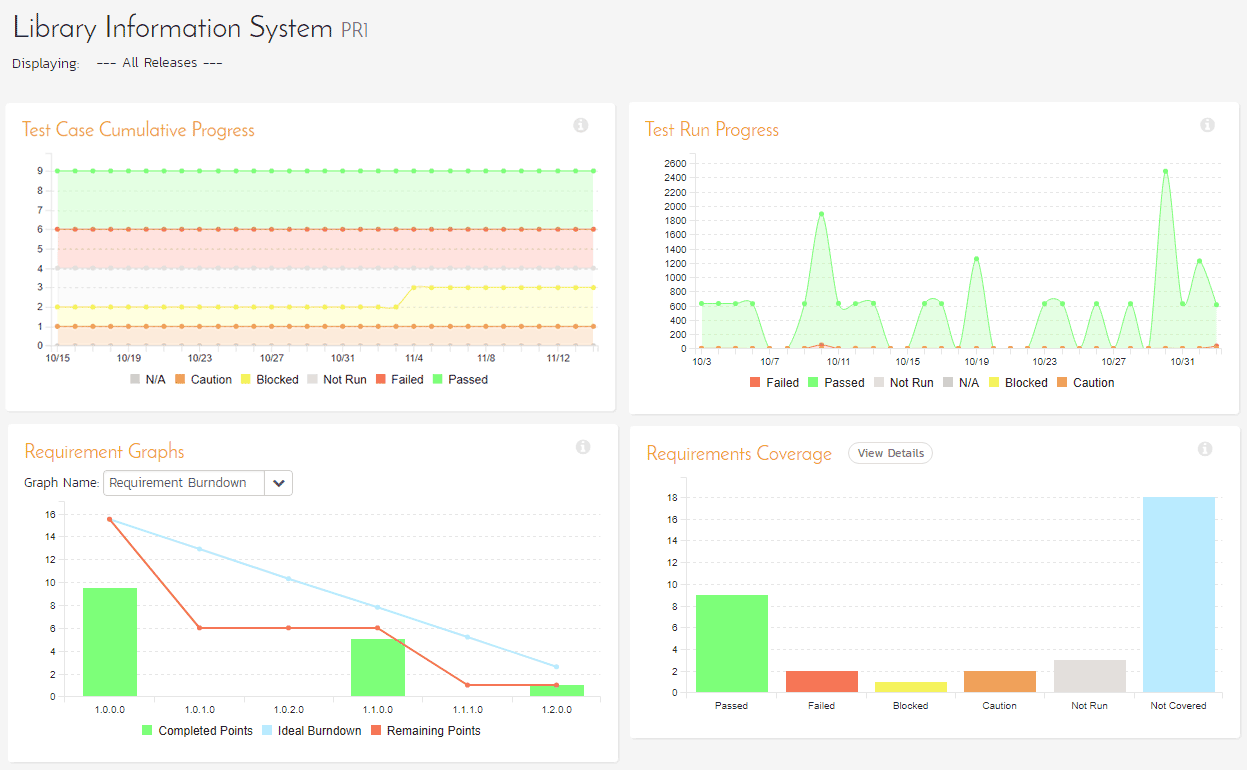
SpiraTest also provides world-class test reporting, metrics, and dashboards:
9. Ability to Insert Code
No codeless test automation tool can incorporate everything possible — tradeoffs need to be made in some areas. So, test authors should have the ability to let testers insert code within the tests for those edge cases. For extra points, don't limit this to UI-specific code, such as JavaScript. Many teams are looking at models such as the Test Automation Pyramid and exercising certain actions as web services instead of UI actions. This will allow for faster, more reliable test scripts.
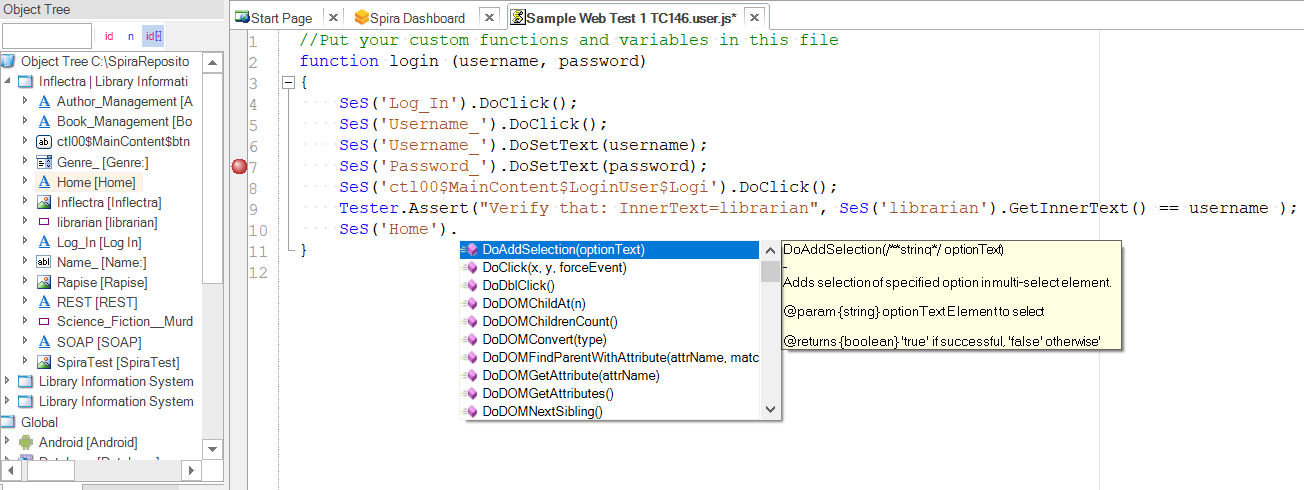
Testing tools might also provide an Integrated Development Environment (IDE) for creating functions and modules in code that can be executed as steps from within the codeless test scenarios:
These coded functions can be written by your test automation engineers as reusable elements, and then incorporated into the main test scenarios in the same way as any of the standard learned objects:
For example, Rapise’s built-in IDE provides all the key features needed to write code fragments, including code-completion, code-folding, intellisense, and an integrated debugger with breakpoints and watches:
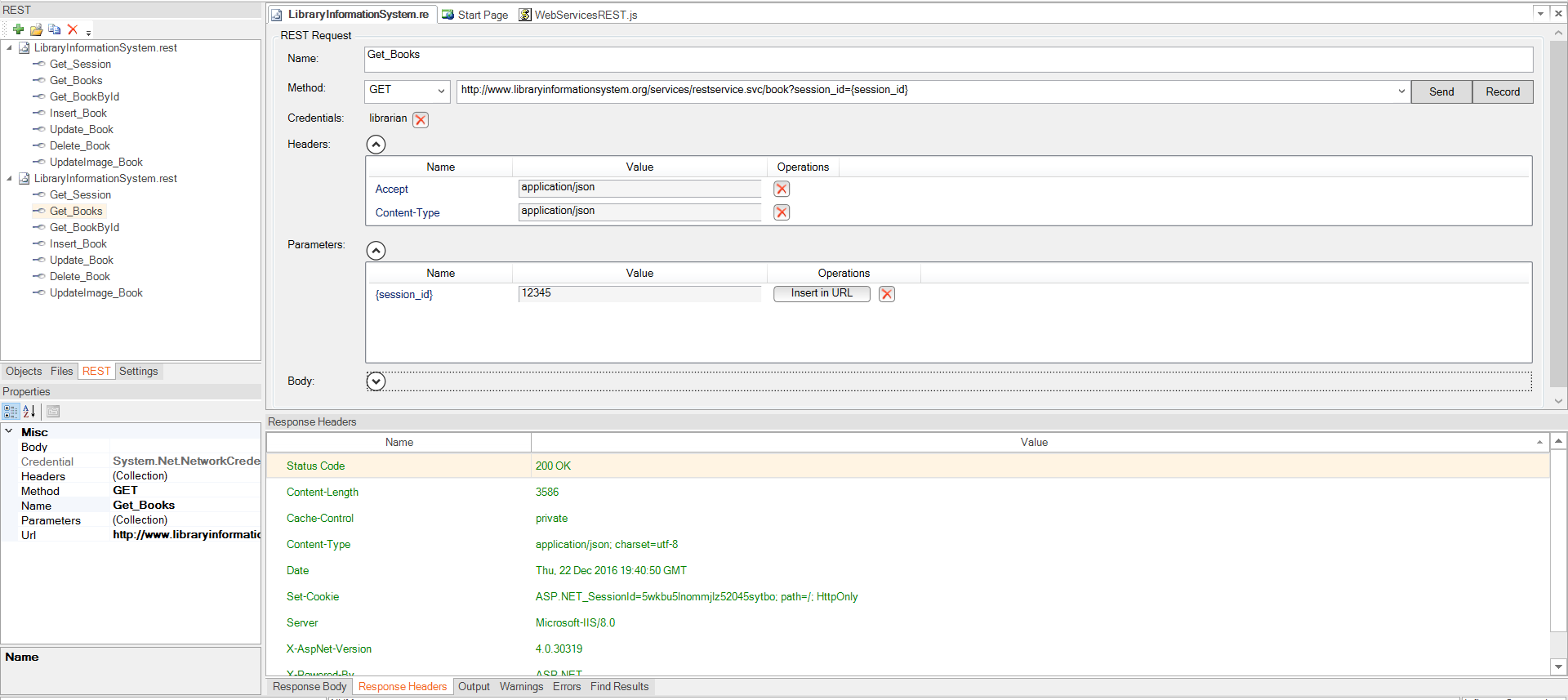
In many cases, testers want to test multiple layers of the application from within the same test scenario. For those situations, Rapise includes a full web service and API testing module that lets developers write object-based web service (REST and SOAP) tests which can be called from the primary codeless interface:
10. Continuous Integration
Older record-and-playback tools required testers to click a button within the tool to execute their tests. In the era of DevOps, test automation is a key ingredient in continuous integration and continuous deployment. Tests should integrate with these pipelines and automatically execute when triggered. For faster execution times, tests should be capable of running in parallel as well.
Look for a codeless automation tool that can be integrated with a wide variety of DevOps, ALM, CI, and test management systems. For example, Rapise integrates with our SpiraTeam application lifecycle management solution, which allows distributed scheduling and execution as well as integration into DevOps pipelines and toolchains:

On top of that, Rapise comes with pre-built libraries and add-ons for integrating automated UI tests into the most common CI/CD platforms like Jenkins, Azure DevOps, TeamCity, TFS, and Bamboo:

Rapise also integrates with a wide variety of cloud-based testing platforms that simplify the management of test environments and devices (especially when dealing with native app or web testing on mobile platforms), including SauceLabs, BrowserStack, and Kobiton.
Bonus: AI Features That Make Codeless Test Automation Even More Intuitive
The next evolution of codeless test automation is not just about removing code from the test authoring process; it is about making the tool intelligent enough to understand intent, adapt to change, and help testers move faster with greater confidence.
Rapise already provides advanced self-healing capabilities that allow tests to recover when application objects change, using multiple locators and intelligent matching to distinguish between a legitimate application failure and a harmless UI change. With Inflectra.ai, this intelligence can be extended further, helping teams reduce maintenance effort, improve test resilience, and keep automation assets aligned with fast-moving applications.
AI also makes test creation more natural and accessible. Instead of starting every automated test from a blank canvas or a manual recording session, testers can use natural language test scenarios as the starting point for automation. Inflectra.ai can help interpret the intent of a scenario, suggest test steps, and accelerate the creation of structured Rapise tests that can then be reviewed, refined, and executed by the QA team.
This is especially valuable for business analysts, manual testers, and domain experts who understand what needs to be tested but may not have the time or technical background to build automation from scratch. By combining Rapise’s codeless automation model with AI-assisted generation, self-healing, and intelligent recommendations, teams can create and maintain automated tests more quickly while preserving the governance, repeatability, and traceability needed for enterprise software delivery.
Why Rapise Stands Out Amongst Codeless Test Automation Tools
As we said at the start, not all codeless test automation tools are created equal. Rapise provides the benefits of codeless test automation by empowering testers who are not programmers without the pain of hard-to-maintain test suites that can’t be modified, reused, componentized, or scaled. At the same time, Rapise doesn’t trap teams inside a basic record-and-playback framework. It provides the best of both worlds where non-technical testers have a codeless and intuitive path while automation engineers still have the depth, extensibility, and platform coverage required as test suites mature and evolve.
The key is offering a codeless experience without being shallow like many other “no-code” testing tools. In other words, Rapise makes codeless automation practical for real-world regression suites, not just quick demos. It applies to every level of coding — codeless for accessibility, low-code for flexibility, and scriptable for edge cases. Rapise also includes generative AI features that reduce the maintenance burden that often limits test automation ROI and support your broader quality management workflows. Ready to see how Rapise can enhance your automated testing for yourself? Get a free trial or request a demo today!