Spira® Platform
Feature Comparison
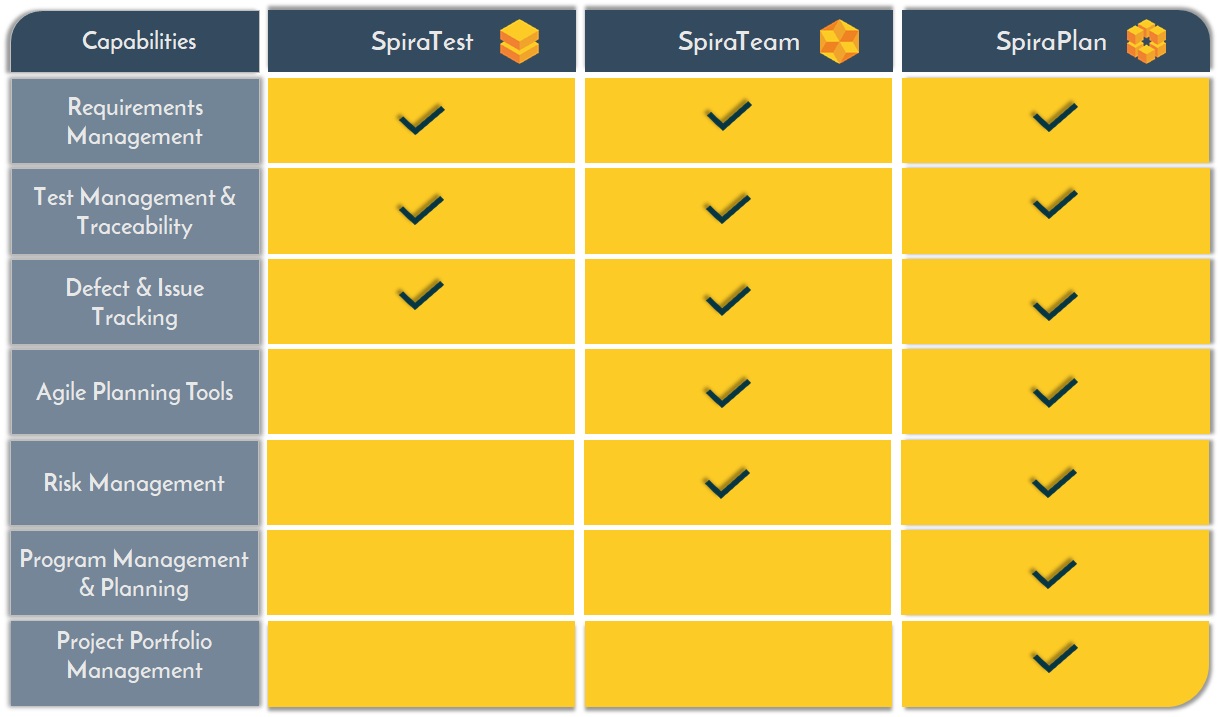
If you're not sure which edition of our Spira® platform is the right one for your environment or use case, don't worry! The following comparison tables and detailed information illustrate the features and capabilities provided by SpiraTest®, SpiraTeam® and SpiraPlan® so that you can see which one is best for you and your organization:
Choosing the Right Spira® Edition
Spira is available in three editions that share the same core platform and user experience, but each edition unlocks a broader scope of functionality as teams move from pure test management to full application lifecycle management and then to enterprise-scale planning. SpiraTest is the foundational edition, SpiraTeam includes everything in SpiraTest plus team delivery capabilities, and SpiraPlan includes everything in SpiraTeam plus program, portfolio, and enterprise planning features.
SpiraTest: Requirements, Test & Defect Management
SpiraTest is designed for organizations whose primary need is test management and quality assurance. It includes core QA artifacts such as requirements, releases, test cases, test steps, test sets, test runs, automation hosts, test configurations, incidents, documents, and reporting-oriented capabilities, but it does not include built-in source code management artifacts, tasks, risks, or resources. That makes it the best fit for QA teams, test managers, manual and automated testers, and organizations that want strong traceability and release validation without adopting a broader ALM workflow.
Who It’s For
- QA teams that need a dedicated system for test management, manual testing, automated testing, and defect tracking.
- Organizations that want strong traceability from requirements to tests and incidents without adding broader project planning complexity.
- Teams adopting a quality-focused platform alongside their existing development or project management tools.
Intended Workflows
- Manage requirements, test cases, test sets, test executions, and incidents in one connected QA workflow.
- Coordinate release validation by organizing test coverage, running tests, and capturing defects before deployment.
- Support hybrid manual and automated testing processes with centralized reporting, documentation, and quality oversight.
SpiraTeam: Software Lifecycle Management for Teams
SpiraTeam is aimed at agile delivery teams that need both quality management and day-to-day delivery coordination. It includes all of SpiraTest, then adds software delivery and team collaboration capabilities such as source code files, commits, pull requests, tasks, risks, resources, planning boards, artifact boards, baselines, time tracking, and requirement and release visualization features. This edition is built for cross-functional agile teams that want requirements, development, testing, and release activities in one ALM platform.
Who It’s For
- Agile product and engineering teams that need to manage development and testing together in a single ALM platform.
- Cross-functional teams that want shared visibility across requirements, tasks, code activity, risks, and QA.
- Organizations that have outgrown pure test management and want tighter collaboration between product, development, and QA.
Intended Workflows
- Plan and refine requirements, break work into tasks, and coordinate delivery across agile teams.
- Connect source code activity, pull requests, testing, and defect resolution into one end-to-end delivery workflow.
- Track team execution using boards, baselines, resources, and progress views while preserving release and quality traceability.
SpiraPlan: Enterprise Software Lifecycle Management
SpiraPlan is the most comprehensive edition and is designed for organizations that need to coordinate work across multiple teams, products, and strategic initiatives. It includes all SpiraTeam capabilities and adds higher-level workspace types such as portfolio and enterprise, along with program and portfolio management, resource planning, and broader risk-management functionality. SpiraPlan is the strategic command center of the Spira suite for enterprise agile planning and execution, with support for program and portfolio management, requirements, release planning, QA, software development, risk management, and analytics. It is best suited for PMOs, enterprise IT leaders, regulated organizations, product portfolios, and larger engineering organizations scaling agile across departments.
Who It’s For
- Enterprises that need to coordinate multiple teams, products, programs, or portfolios from a single platform.
- PMOs, IT leaders, and regulated organizations that need higher-level planning, governance, resource visibility, and risk management.
- Organizations scaling delivery across departments that want both team-level execution and enterprise-level oversight.
Intended Workflows
- Align strategic initiatives with programs, products, releases, and team execution across the organization.
- Manage portfolio planning, resource allocation, risk visibility, and cross-project dependencies at scale.
- Provide executive and operational oversight while keeping requirements, development, testing, and delivery connected in one system.
Detailed Feature Comparison Matrix
The following table defines the detailed differences in functionality between the three Spira editions:
| Spira® Edition | SpiraTest® | SpiraTeam® | SpiraPlan® |
| Overview | |||
| Description | Requirements, Test, and Defect Management | Software Development Lifecycle Management for Teams | Enterprise Software Development Lifecycle Management |
| Pricing | $ | $$ | $$$ |
| Product Features | |||
| Requirements Management | ✅ | ✅ | ✅ |
| Document Management | ✅ | ✅ | ✅ |
| Defect/Bug Tracking | ✅ | ✅ | ✅ |
| Test Case Management | ✅ | ✅ | ✅ |
| Test Set/Suite Management | ✅ | ✅ | ✅ |
| Content Editing and Diagram Creation | ✅ | ✅ | ✅ |
| Requirements Mind Map & Document Views | ✅ | ✅ | |
| Project Estimation & Management | ✅ | ✅ | |
| Release/Iteration Planning | ✅ | ✅ | |
| Task Management | ✅ | ✅ | |
| Scrum/Kanban Planning Board | ✅ | ✅ | |
| Source Code Traceability | ✅ | ✅ | |
| Instant Messenger (IM) | ✅ | ✅ | |
| Baseline Support | ✅ | ✅ | |
| Risk Management | ✅ | ✅ | |
| Time Tracking | ✅ | ✅ | |
| Time Tracking Approvals | ✅ | ||
| Program Management | ✅ | ||
| Program Capabilities & Milestones | ✅ | ||
| Scaled Agile (SAFe) Support | ✅ | ||
| Portfolio Management | ✅ | ||
| Integration Options: | |||
| Unit Testing Tools | ✅ | ✅ | ✅ |
| Automated Functional Testing Tools | ✅ | ✅ | ✅ |
| External Defect Trackers | ✅ | ✅ | ✅ |
| Requirements Mgt Tools | ✅ | ✅ | ✅ |
| Continuous Integration Build Servers | ✅ | ✅ | ✅ |
| REST and SOAP APIs | ✅ | ✅ | ✅ |
| Version Control Tools | ✅ | ✅ | |
| OData Reporting API | ✅ | ||
| Security & Enterprise Features | |||
| Single-Sign On (SSO) using OAuth or LDAP | ✅ | ✅ | ✅ |
| Multi-Factor Authentication (MFA) | ✅ | ✅ | ✅ |
| System Requirements (on-premise only) | |||
| Windows Server 2019, 2022, 2025 | ✅ | ✅ | ✅ |
| IIS 10.0 or newer | ✅ | ✅ | ✅ |
| SQL Server 2019 or later | ✅ | ✅ | ✅ |
| Customer Support | |||
| Unlimited Email Support | ✅ | ✅ | ✅ |
| Unlimited Phone Support | ✅ | ✅ | ✅ |
| Free upgrades/support for 1-year | ✅ | ✅ | ✅ |