Self Healing Tests
The achilles heel of test automation is dealing with applications that either change repeatedly or are not well designed for test automation in the first place. Rapise addresses that problem with a unique self-healing approach called SmartActions, designed to make automated web tests more resilient when buttons move, labels change, or elements are restructured in the interface. Instead of depending only on brittle technical locators, Rapise combines stored object information with natural language action intent, then uses AI-based visual recognition to recover the correct element when the UI no longer matches the original test exactly.
Reducing the Maintenance Cost
Traditional web UI automation often breaks for reasons that have little to do with real product defects. A developer changes a CSS class, a control is restyled, or a page layout is adjusted, and suddenly a test that was previously stable can no longer find the target object. The result is wasted time investigating false alarms and updating repositories instead of validating the application. Rapise is aimed directly at that maintenance burden by helping tests understand not just where an object was, but what the test was trying to do.
That shift is important because the intent behind an action is often more stable than the underlying locator. If a test step is meant to click the “Submit Order” button, enter text into the username field, or open a specific menu option, those meanings remain understandable even when the technical implementation changes. In Rapise, SmartActions uses that context to make recovery decisions when the original lookup fails.
How Self-Healing Works
At a practical level, the new functionality works by associating natural language descriptions with individual test actions. Those descriptions help Rapise interpret what each step is supposed to accomplish.
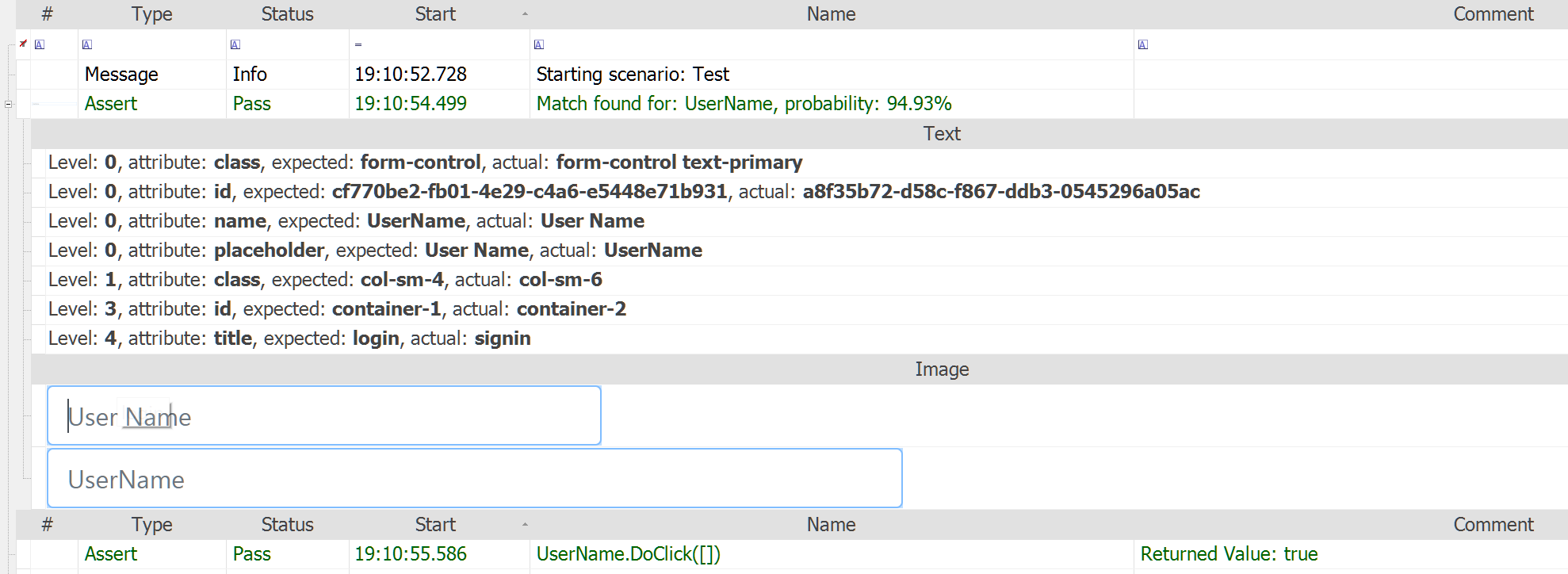
During execution, Rapise still starts with the standard lookup against the existing object repository. If the object is found normally, the test proceeds as expected with no extra recovery required. When the normal lookup fails, Rapise moves into its AI-assisted recovery flow. In this flow, the SmartActions uses AI-based visual and contextual analysis to identify the most likely replacement for the missing object. In other words, it does not simply retry the same selector over and over. It uses the saved intent and the visible interface context to determine what element now corresponds to the original step. It also has a saved copy of the original image as well as the intent description:
The recovery process is multi-level:
- First, Rapise attempts standard repository-based lookup.
- Next, it applies AI-based recovery using visual recognition and contextual clues.
- Finally, it performs deeper inspection and determines the most appropriate resolution, such as proceeding, waiting, skipping, or failing based on what it finds.
This layered approach is useful because it allows Rapise to preserve normal deterministic automation behavior where possible, while only invoking AI-driven healing when needed.
Making the Change Permanent
One of the most important parts of this new feature is that healing is not just temporary. When SmartActions successfully recovers an object, Rapise can generate patch files to update the object repository.

That means the system is not merely rescuing a single test run; it is also helping the test suite learn from the UI change so future runs can benefit from the updated mapping without requiring repeated AI intervention.

For end users, this is where the maintenance savings become tangible. Instead of manually chasing every UI change across dozens or hundreds of automated steps, teams can review and apply repository updates generated from successful healing. The net effect is less time spent repairing scripts and more time spent evaluating actual application quality.
Self-Healing in Action
To illustrate the power of self-healing, consider a simple example. We have recorded tests against the current version of an application. Now we want to modernize that application, so that the business logic is the same, but the application is 100% different otherwise. However, we still want to use the existing tests that we have recorded and let Rapise self-heal them for us.
Consider our sample ASP.NET traditional web application:

Now imagine that we have modernized this entire application to use the React front-end technology instead. This is not just a minor cosmetic update; it represents a complete front-end technology shift. From an automation perspective, that is usually where recorded tests become expensive to maintain. The user journey may still be “log in, go to books, add a new book, save,” but the UI implementation underneath is radically different.
For example, the application shown above, looks completely different when it was modernized to React:

In older test automation models, that would usually mean going back into the test, relearning objects, editing locators, and repairing the repository by hand. With Rapise, the self-healing flow changes that experience. Because the recorded actions carry descriptive intent, the test has more context about what it is actually trying to do, not just which technical object it originally found.
When the recorded ASP.NET test was played back against the React version, Rapise was able to continue execution using self-healing. That is the important point. The test was not tied so rigidly to the original implementation that it simply failed at the first UI mismatch. Instead, Rapise used the SmartActions approach to interpret the action, inspect the changed interface, locate the equivalent elements in the React UI, and continue the scenario.

From an end-user perspective, this is where the feature becomes much easier to understand. Self-healing is not magic and it is not random guesswork. Rapise still begins with the normal learned objects and repository references. But when those no longer line up with the current application, it has another layer to fall back on. That fallback uses visual and contextual analysis to identify the correct element when the UI has changed.
In practical terms, that means a test step such as creating a book is no longer understood only as “click this exact stored object.” It can also be understood as “perform this action on the control that now corresponds to the original intent.”. That is what allows Rapise to adjust dynamically to changes in the UI - it knows what was the original intent of the user.
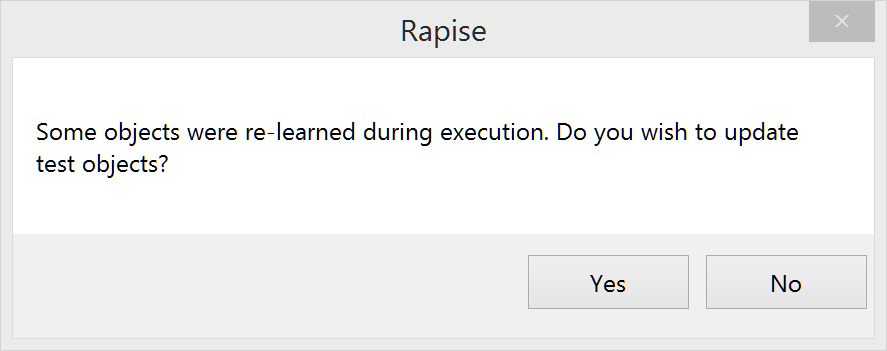
After Rapise successfully played the test using self-healing, the user is then able to apply the detected changes. Once those updates are accepted, the test can play back against the React application again without needing AI recovery. The updates are presented to the user in a simple to understand format where you can Approve or Reject them either individually or in bulk:
That is a critical part of the value proposition. Self-healing is not only about rescuing one execution. It is also about shortening the path back to stable deterministic automation. When SmartActions successfully recovers an object, Rapise can generate patch files that update the repository so future runs benefit from the healing without repeated AI intervention.
For teams maintaining large automation suites, that is exactly the difference between a helpful demo and a genuinely useful feature. If AI only helps during one run but leaves the suite in a permanently fuzzy state, maintenance is still a problem. But if AI helps bridge the change, surfaces the updates, and lets the team convert those discoveries into an updated repository, then the test suite becomes stable again on the new UI.
For example, in our application, the original playback took about 15 seconds, playback with AI took about 2 minutes, and after self-healing, the tests went back to taking about 15-20 seconds again:

That workflow is important because it keeps AI in the right role. It is there to help teams adapt to change, not to replace test engineering discipline altogether. In the Library Information System example, the AI layer provided the bridge between two materially different implementations of the same workflow. Once the changes were accepted, the test became stable again on the new version.
Try Rapise free for 30 days, no credit cards, no contracts
Start My Free TrialAnd if you have any questions, please email or call us at +1 (202) 558-6885