Data Integration: KronoDesk & SpiraTeam
The integration between KronoDesk (Help Desk) and SpiraTeam (ALM/Incident Management) creates a seamless bridge between customer support and technical delivery. This flow ensures that customer-reported issues are accurately captured, triaged, and tracked through the development lifecycle without manual data duplication.
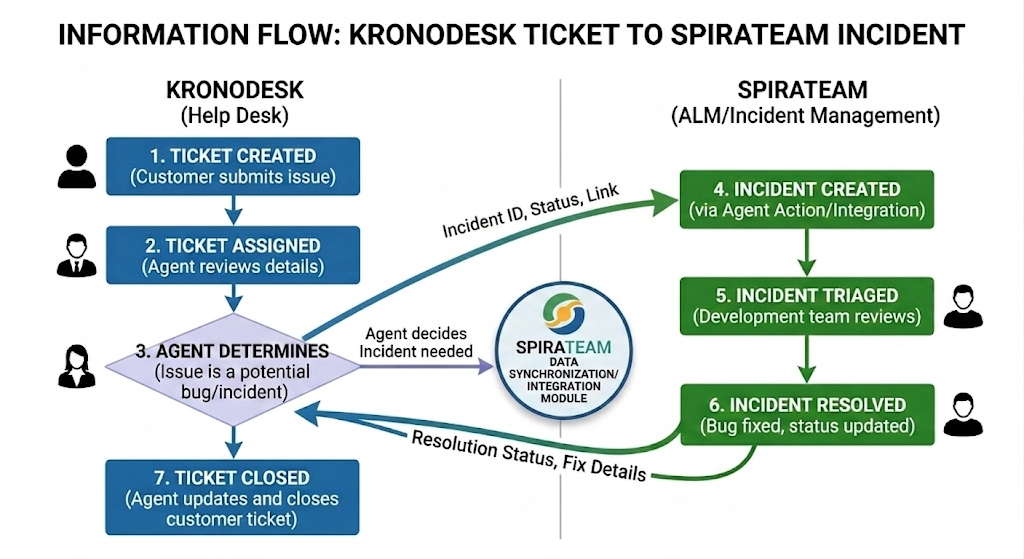
The Trigger: Support Triage
- The information flow begins when a support agent reviews a Help Desk Ticket in KronoDesk. If the agent determines the issue is a software defect or requires development intervention:
- The agent uses the built-in "Create Incident" action within the KronoDesk interface.
- This creates a direct link between the support ticket and a new Incident in SpiraTeam.
Upstream Data Flow (KronoDesk → SpiraTeam)
When the incident is created, the following core data is pushed into SpiraTeam to provide context for the engineering team:
- Identity: The unique Ticket ID is mapped to the SpiraTeam Incident for cross-referencing and appears as an attachment link in the Spira incident. The Support Agent can select the appropriate SpiraTeam Product in which the incident should be logged. Multiple Incidents can be logged from a single support ticket if needed.
- Context: The Ticket Title, Description, and Customer Type are populated. The Support agent can add more context to the Incident and delete any unneeded information.
- Attachments: Any screenshots or logs provided by the customer are transferred to the SpiraTeam Incident record.
Bidirectional Progress Tracking
Once the connection is established, the two systems maintain a synchronized relationship:
- Status Visibility: Support agents in KronoDesk can view the real-time SpiraTeam Status (e.g., In Progress, Fixed, or Closed) directly from the ticket view.
The Resolution Loop
When the development team resolves the Incident in SpiraTeam:
- The status update flows back to KronoDesk.
- The support agent receives a notification that the "Linked Incident" is fixed.
- The agent can then provide the final resolution to the customer and close the original ticket, completing the "Customer-to-Code" loop.
Data Integration: SpiraTeam & Azure DevOps (ADO)
The integration between SpiraTeam and Azure DevOps is powered by the Spira Data Sync service . This integration ensures that the business-side triage performed in SpiraTeam is automatically translated into actionable work items for the development team in ADO, maintaining a bidirectional link throughout the lifecycle.
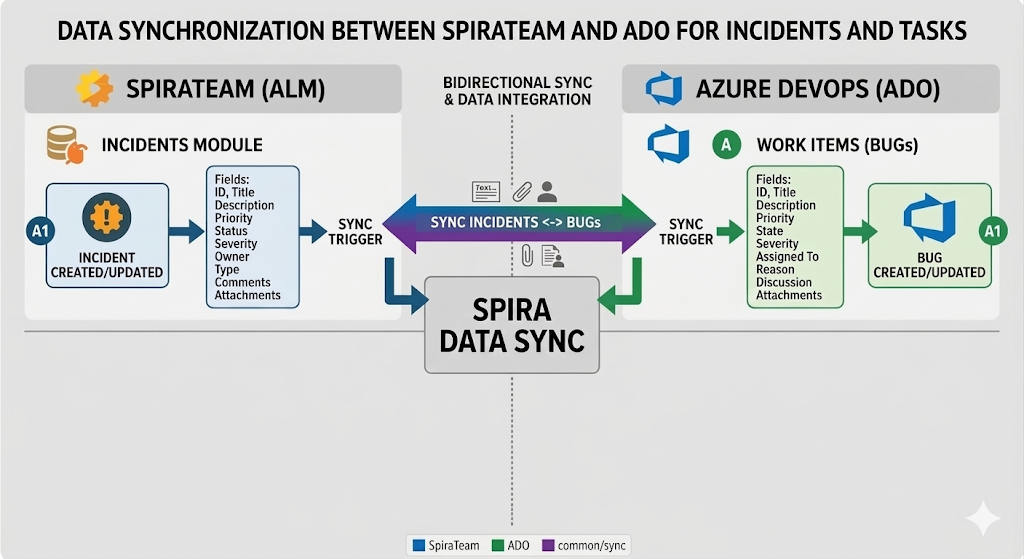
The Trigger: Incident to Bug
When a support-related Incident is triaged in SpiraTeam with a Type and status that is mapped to ADO, the Spira Data Sync triggers a creation event:
- A corresponding Work Item (typically a Bug) is automatically generated in the linked Azure DevOps project.
- The two items are "mapped," meaning any change to one can reflect in the other based on your configuration rules.
Bidirectional Field Mapping
The Spira Data Sync ensures that critical metadata remains consistent across both platforms. Standard mapped fields include:
- Core Details: Title, Description, and unique ID cross-referencing.
- Prioritization: Severity and Priority levels are synced so developers know which bugs to hit first.
- Ownership: The "Assigned To" field can be synced to ensure accountability is visible in both systems.
Real-Time Status & Feedback Loop
As the developer works within Azure DevOps, the "pulse" of the project flows back to the management team:
- Status Updates: When a developer moves a Work Item from To Do to Doing or Done in ADO, the SpiraTeam Incident status updates automatically (e.g., to "Developed" or "Fixed").
- Technical Comments: Discussion threads in ADO can be synced back to SpiraTeam as "Incidents Comments," allowing the Support Agent (via the Kronodesk link) to see technical progress without requiring access to ADO.
- Resolution: Once the code is committed and the ADO Work Item is closed, the SpiraTeam Incident is moved to a resolved state, triggering the final notification to the original Kronodesk ticket.
Integration Benefits
- Developer Focus: Developers stay in ADO and never have to log into the Help Desk or ALM to provide status.
- Management Visibility: Project managers see the real-time health of the release in SpiraTeam based on actual dev activity.
- Data Integrity: Eliminates "copy-paste" errors and ensures that attachments (logs/screenshots) follow the issue from the customer all the way to the developer's IDE.