Overview of the Metric
This metrics is to calculate the percentage of test quality based on defect volume reported during testing. The typical formula for this is as follows:
Test Quality = (Number of defects detected / Number of test cases run) x 100%
To create this report we just just need to join the results from the Spira Incidents table with those from the Test Runs table. Then we join them onto the main Releases table so that we can get the test case quality per release. We also need to make sure we filter out any deleted releases or incidents.
The Custom Report
The following Entity SQL custom report can be used to create this report:
select GR2.RELEASE_NAME, GR2.IC_COUNT * 100 / GR2.TR_COUNT as TEST_QUALITY_PERCENT
from
(
select GR.RELEASE_NAME, sum(GR.IC_COUNT) as IC_COUNT, sum(GR.TR_COUNT) as TR_COUNT
from
((select RL.VERSION_NUMBER as RELEASE_NAME, 0 as IC_COUNT, count(TR.TEST_RUN_ID) as TR_COUNT
from SpiraTestEntities.R_Releases as RL
inner join SpiraTestEntities.R_TestRuns as TR on RL.RELEASE_ID = TR.RELEASE_ID
where RL.PROJECT_ID = ${ProjectId}
and RL.IS_DELETED = False
group by RL.VERSION_NUMBER)
union
(select RL.VERSION_NUMBER as RELEASE_NAME, count(IC.INCIDENT_ID) as IC_COUNT, 0 as TR_COUNT
from SpiraTestEntities.R_Releases as RL
inner join SpiraTestEntities.R_Incidents as IC on RL.RELEASE_ID = IC.DETECTED_RELEASE_ID
where RL.PROJECT_ID = ${ProjectId}
and IC.IS_DELETED = False
and RL.IS_DELETED = False
group by RL.VERSION_NUMBER)) as GR
group by GR.RELEASE_NAME) as GR2
where GR2.TR_COUNT > 0
order by GR2.RELEASE_NAME
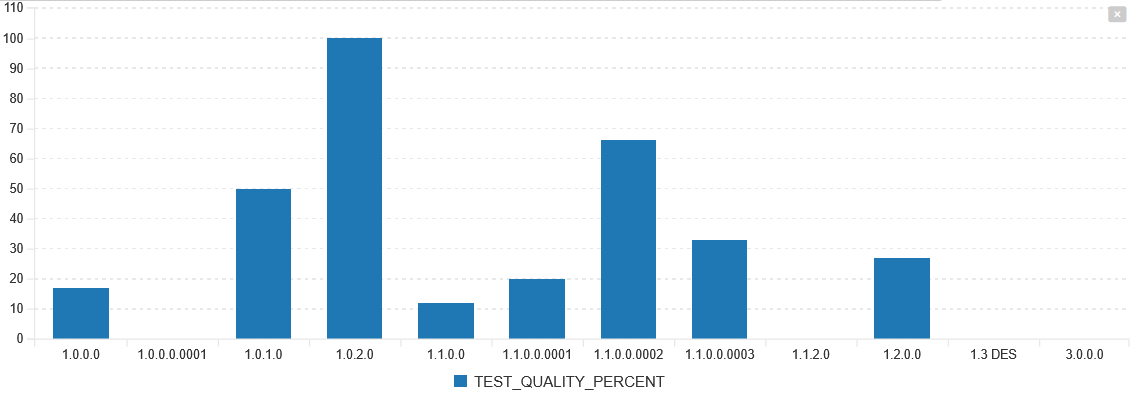
When you run this report for a project, you will see a bar chart that looks like the following:
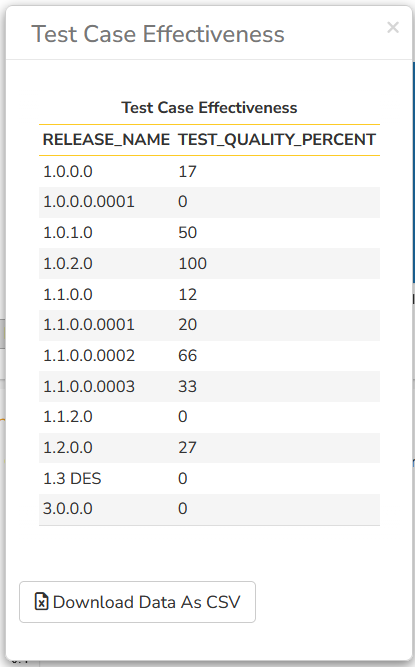
You can of course get the raw data from the report as well: